Msgraph Onedrive Create folder
Responsible for creating new folder in One Drive
Input
Any object with property contained folder name and optional dynamic created location id. example:
{
  folderName: desired folder name
  sourceFolder: location getting from previous connectors
}
Settings
- (REQUIRED) Authentication: A valid office 365 credential item
- (REQUIRED) Folder Name: Desired folder name, set dynamic
- (Optional) Folder Location: The existing folder in which you want to create new folder. If none specify, new folder will be created in root folder.
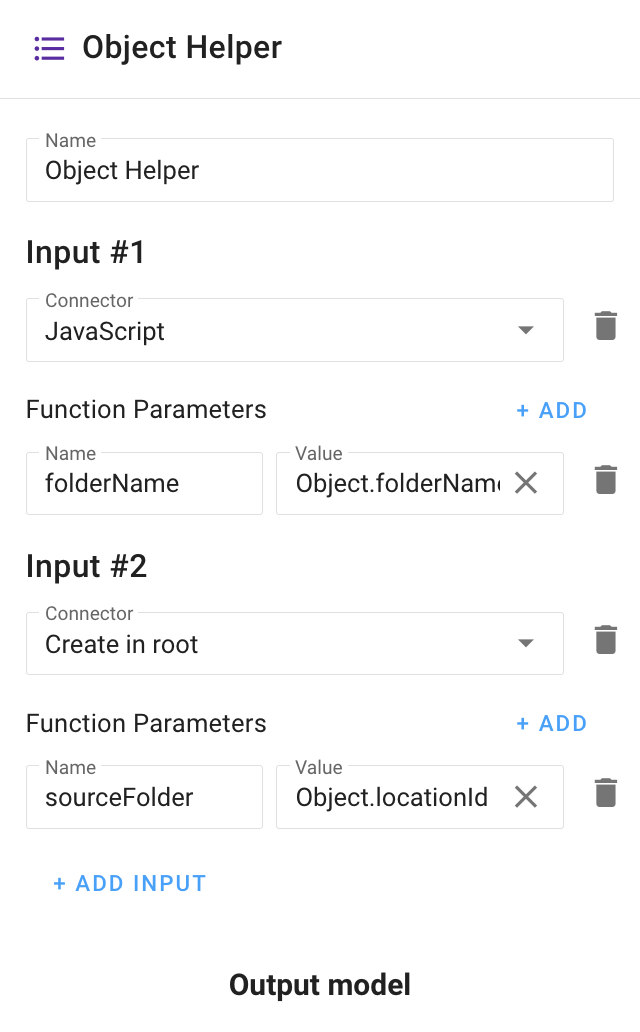
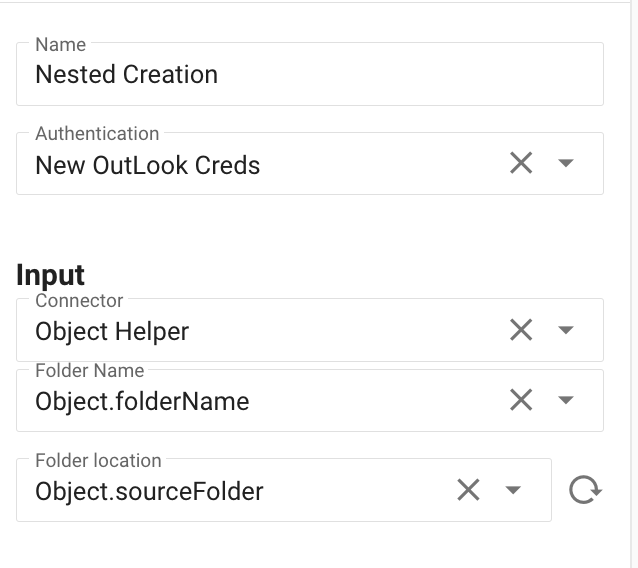
If you want to create new folder inside previous created folder, you need to place ObjectHelper before executing this one action. In ObjectHelper combine desired folder name with locationId from previous connectors.
Example:
Then select this options in your connector:
Output:
Object with property: location
Example:
{
  location: - the identifier of the created folder
}
Edge case:
- If you try to create already created folder, the error will be thrown